On this page
The Short Answer
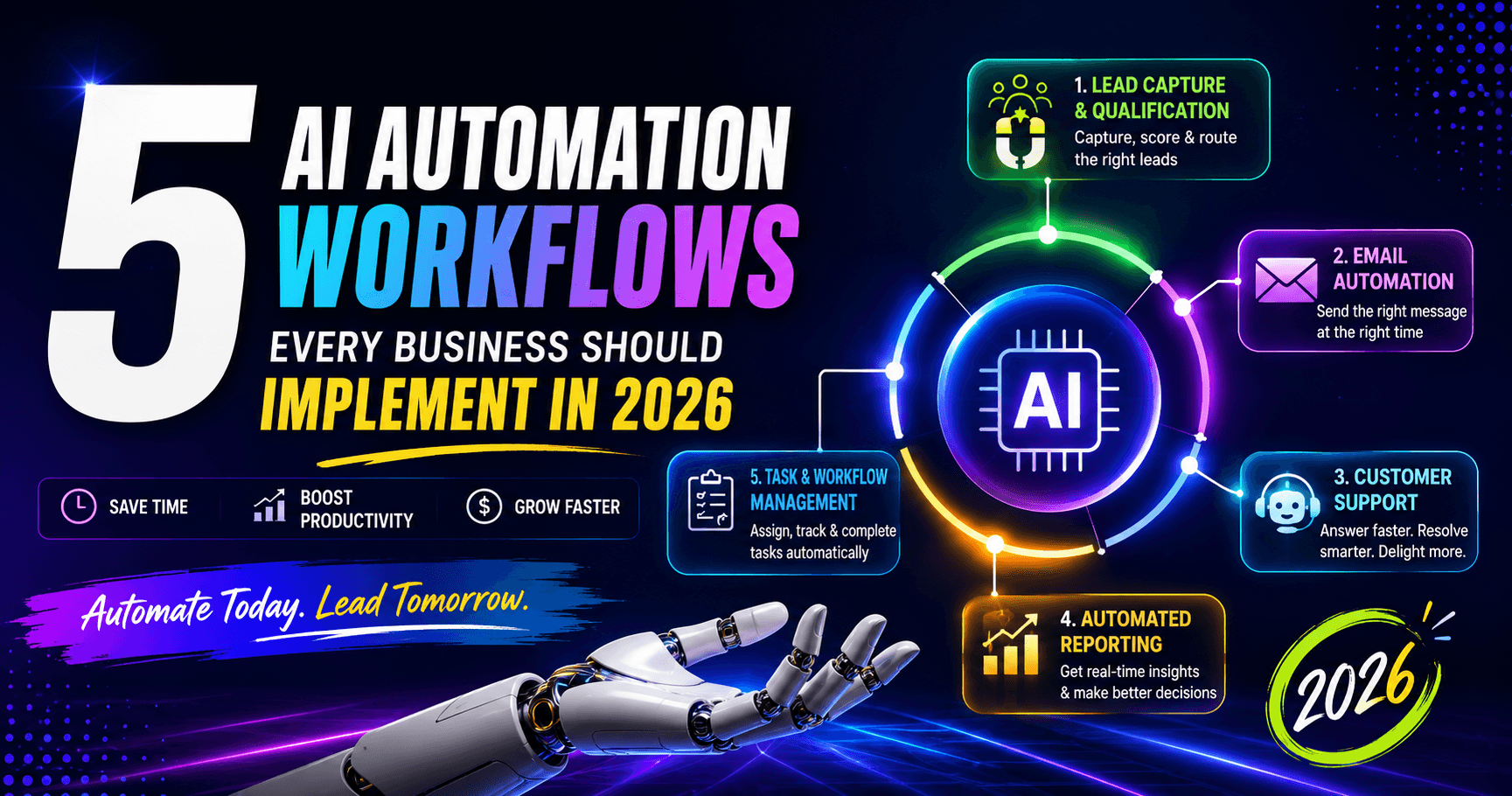
The five workflows worth setting up first are AI lead capture and qualification, AI-powered email follow-up, customer support automation that escalates complex cases to people, automated business reporting, and turning emails, meetings and messages into assigned tasks. Each connects AI to the tools you already use, so routine work runs automatically and people step in only when needed.
5 AI Automation Workflows Every Business Should Implement in 2026
AI automation is changing the way businesses operate.
For years, companies have relied on employees to manually handle repetitive tasks such as responding to emails, qualifying leads, preparing reports, updating spreadsheets, and following up with customers.
Today, many of these processes can be automated using AI.
The real opportunity isn't simply using an AI chatbot. Businesses can now connect AI with their existing tools and workflows to create systems that automatically collect information, make decisions, perform tasks, and notify employees when human involvement is required.
Here are five AI automation workflows every business should consider implementing in 2026.
- AI Lead Capture & Qualification
Generating leads is only the first step.
The bigger challenge is responding to those leads quickly and determining which prospects are worth prioritizing.
An AI lead qualification workflow can automatically process incoming leads from your website, advertising campaigns, landing pages, contact forms, and social media.
How it works
New lead → AI analyzes information → Lead is scored → Lead is categorized → Sales team is notified
For example, an AI system can analyze:
Company size Industry Customer requirements Budget Location Buying intent Previous interactions
The system can then assign a lead score and automatically send high-value prospects to the sales team.
Why it matters
Speed matters in sales.
Instead of allowing leads to sit in an inbox for several hours, automation can immediately process and route them to the right person.
Potential benefits:
Faster lead response Better lead prioritization Less manual data entry Improved sales productivity More consistent follow-ups 2. AI-Powered Email Automation
Email is one of the most repetitive activities inside many organizations.
Teams constantly send:
Welcome emails Follow-ups Appointment confirmations Customer updates Sales messages Support responses Internal notifications
AI can help automate much of this process.
How it works
A workflow can monitor customer activity and automatically determine what communication should happen next.
For example:
New lead → AI analyzes lead → Personalized email → Wait → Follow-up → Notify sales
Instead of sending exactly the same message to everyone, AI can personalize the communication based on the customer's information and previous interactions.
Example
A customer downloads a business guide.
The workflow can automatically:
Capture the customer's information. Add the lead to the CRM. Send a personalized email. Wait several days. Check whether the customer responded. Send a follow-up if necessary. Notify the sales team when the customer shows buying intent. Why it matters
Automation ensures that potential customers don't get forgotten.
It also allows marketing and sales teams to spend less time manually managing routine communication.
- AI Customer Support Automation
Customer support is another area where AI automation can deliver significant value.
Many support teams repeatedly answer the same questions.
Examples include:
"What are your business hours?" "Where is my order?" "How do I reset my password?" "What services do you provide?" "How much does this service cost?" "How can I cancel my subscription?"
An AI support workflow can handle common requests automatically while escalating complex situations to human agents.
How it works
Customer message → AI understands request → Searches knowledge base → Generates response → Resolves or escalates
If the AI cannot confidently answer the question, the conversation can automatically be transferred to a human.
Why it matters
The objective isn't to remove humans from customer support.
It's to allow humans to focus on the conversations where human judgment and empathy are most valuable.
Benefits can include:
Faster responses 24/7 availability Reduced repetitive work Better support consistency Faster escalation of complex issues 4. Automated Business Reporting
Business reporting can consume hours every week.
Employees often have to collect information from different platforms before creating a report.
For example:
CRM + Google Analytics + Advertising platforms + Sales system → Report
AI automation can bring these sources together and generate a structured business summary.
What an automated report can include Revenue Sales Leads Conversion rate Advertising performance Website traffic Customer activity Operational metrics
But AI can go beyond simply displaying numbers.
It can summarize:
What happened?
Why did it happen?
What changed?
What should the business pay attention to next?
Example
Instead of receiving a spreadsheet containing hundreds of numbers, a business owner could receive:
"Website leads increased by 18% this week, while conversion rates declined by 6%. The largest drop occurred on the mobile landing page."
That's much more actionable than a spreadsheet alone.
- AI Task & Workflow Management
Another powerful application is automatically converting information into tasks.
Businesses receive requests from:
Emails Meetings Customer conversations Forms Slack or Teams messages CRM activities
AI can analyze these messages and automatically determine what action needs to happen.
Example workflow
Email received → AI identifies task → Task created → Employee assigned → Deadline added → Reminder sent
For example, a customer might email:
"Please send us the updated proposal by Friday."
Instead of an employee manually creating a task, AI can identify the request and create:
Task: Send updated proposal Deadline: Friday Assigned to: Sales team
Why it matters
Small tasks are easy to forget when teams are busy.
Automation can make sure important actions don't disappear inside inboxes and conversations.
How to Decide What to Automate First
Not every business process should be automated.
The best candidates usually have five characteristics.
- Repetitive
The task happens frequently.
- Time-consuming
Employees spend significant time completing it.
- Predictable
The process follows a relatively consistent pattern.
- Measurable
You can determine whether automation actually improved the process.
- Low-risk
An error won't create serious consequences.
Start with one workflow rather than trying to automate the entire company at once.
Once the first workflow works reliably, you can expand into other areas.
AI Automation Doesn't Mean Replacing People
One of the biggest misconceptions about AI automation is that the goal is to eliminate human involvement.
That's not necessarily the best approach.
The strongest business workflows combine AI + automation + human judgment.
AI can handle repetitive work while employees focus on:
Strategy Creativity Relationships Decision-making Complex problem-solving Customer experience
The objective is to give employees leverage, not simply remove them from the process.
The Future of Business Automation
AI automation is moving beyond individual tools.
The real opportunity is connecting multiple systems into intelligent workflows.
Imagine:
Website visitor → Lead captured → AI qualifies lead → CRM updated → Personalized email sent → Sales representative notified → Meeting scheduled → Follow-up automated
The entire process can happen with minimal manual intervention.
That's where AI automation becomes truly powerful.
Final Thoughts
AI automation can help businesses save time, reduce repetitive work, improve consistency, and scale operations more efficiently.
But successful automation doesn't begin with asking:
"What AI tool should we buy?"
Instead, ask:
"What repetitive business process is slowing our team down?"
Find that process.
Measure the time and cost involved.
Automate it.
Then measure the results.
The businesses that approach AI this way will be better positioned to scale efficiently in 2026 and beyond.
Automate. Optimize. Grow.
Sources: Harvard Business Review — The Short Life of Online Sales Leads (March 2011); OpenAI — A practical guide to building agents (2025).
This ties directly into our AI Automation service, where we go deeper on scope, process, and cost.
We go deeper on automation for Logistics businesses on our dedicated industry page.