On this page
The Short Answer
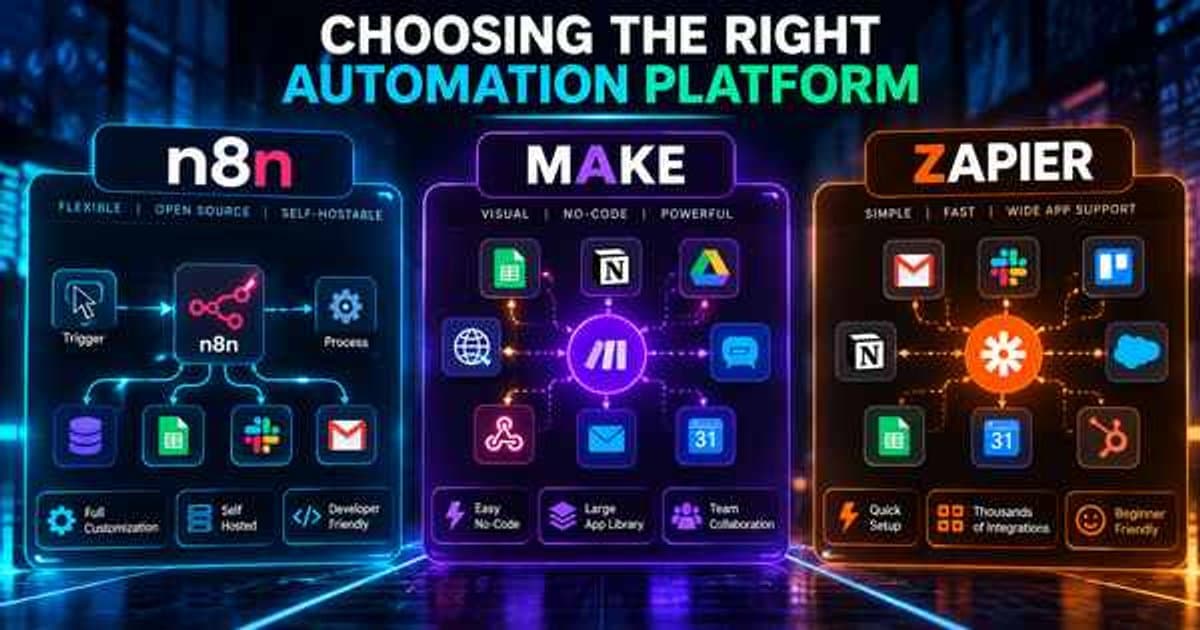
Pick Zapier if you want something working today and you're connecting two well-known apps. Pick Make if your workflow has real branching logic but doesn't need custom code or self-hosting. Pick n8n if you're running high volume, need data to stay on infrastructure you control, or need genuinely custom logic. Many growing teams end up using more than one.
What Each Platform Is Actually Built For
Zapier is the simplest of the three — it's built for straightforward, linear "when this happens, do that" automations across thousands of apps, with almost no learning curve. Make (formerly Integromat) trades some of that simplicity for a visual, branching canvas that handles more complex logic without needing custom code.
n8n sits at the more technical end. It's source-available under a fair-code license (its Sustainable Use License), self-hostable, and gives you far more control over data transformation and custom logic — a better fit when workflows get genuinely complex or when data privacy requirements matter.
Source: Zapier — Plans & Pricing | Zapier (October 2026).
Cost and Scale Behave Differently
Zapier and Make both price primarily around the number of tasks or operations you run each month, which means costs can climb quickly as a workflow scales up in volume. n8n's self-hosted option removes that per-task pricing entirely, which matters a lot once you're running thousands of workflow executions a month.
That flexibility comes with a tradeoff: someone needs to maintain the hosting environment, whereas Zapier and Make are fully managed and require no infrastructure thinking at all.
Source: n8n Docs — Host n8n.
How Much Custom Logic Do You Actually Need?
If your workflow is genuinely simple — a new form submission creates a CRM record — any of the three will work, and Zapier's simplicity usually wins on setup speed. Once you need conditional branching, error handling, retries, or transforming data between mismatched formats, Make and n8n pull ahead.
n8n specifically shines when a workflow needs custom code snippets, complex API pagination, or has to run reliably without depending on a third-party platform's uptime.
How We Decide Which One to Use
Rather than defaulting to one platform, the right choice depends on your existing stack, your team's technical comfort, and how the workflow is likely to grow. A five-step lead-routing automation rarely needs n8n's full power; a multi-system inventory sync across a CRM, warehouse tool, and accounting platform usually does.
The platform is a means to an end — the workflow design matters more than which tool executes it, which is why we scope the automation first and pick the platform second.
Quick Comparison at a Glance
Figures last checked: October 2026 — against public pricing pages and published 2026 industry rate guides.
| Platform | Pricing model | Learning curve | Hosting | Best for |
|---|---|---|---|---|
| Zapier | Per task (successful action steps) | Lowest | Fully managed | Simple, linear automations |
| Make | Per credit | Moderate | Fully managed | Branching logic, no code needed |
| n8n | Per execution (cloud) or free (self-hosted) | Steepest | Cloud or self-hosted | High volume, custom logic, data control |
Source: Make Help Center — Credits (August 2025).
What It Actually Costs Once You're Running Real Volume
Pricing looks similar at a glance, but the three platforms bill for completely different things, so costs diverge fast once a workflow runs at real volume.
As of late 2026, published pricing runs roughly as follows: Zapier's Professional plan starts around $19.99/month (billed annually) and covers a limited number of tasks before you need to upgrade. Make prices its plans by monthly credits, which replaced operations as its billing unit in 2025 at one credit per operation, with a noticeably lower entry cost per unit of usage. n8n's cloud Starter plan is listed at €20/month billed annually for 2,500 executions, while n8n's self-hosted Community edition is free and removes per-execution billing entirely, in exchange for running and maintaining your own server.
Take a workflow that runs 5,000 times a month with a handful of steps each run. On Zapier, every successful action step counts as a task (triggers, Filters, Paths and Formatter steps don't, per Zapier's help center), so a multi-step Zap can still burn through a paid tier quickly. On Make, the same workflow is billed in credits rather than tasks, which generally stretches further per dollar. On n8n's cloud plan, 5,000 executions would exceed the Starter tier's 2,500 limit and need the next tier up — but self-hosted, the same volume costs only the price of the server it runs on, whether that's 5,000 executions or 50,000.
The practical takeaway: at low volume, the sticker price differences barely matter. Once a workflow is running thousands of times a month, the billing model you're on matters more than the headline monthly price.
Sources: Zapier — Plans & Pricing | Zapier (October 2026); n8n — n8n Plans and Pricing.
A Few Scenarios Where Each Platform Clearly Wins
Rather than a single "best" answer, here's where each platform tends to be the obvious choice:
- Choose Zapier when you need something working today, the automation is simple and linear, and you're connecting two well-known apps that both have first-class Zapier integrations.
- Choose Make when the workflow has real branching logic — multiple conditions, parallel paths, or error handling — but doesn't need custom code or self-hosting.
- Choose n8n when you're running high volume where per-task pricing would get expensive, when data has to stay on infrastructure you control, or when a workflow needs genuinely custom logic that a visual builder alone can't express.
Many businesses end up using more than one — Zapier for a few simple connections the team sets up themselves, and n8n or Make for the handful of workflows that are actually core to how the business runs.
We cover this in more depth as part of our n8n Automation work — explore the full scope and how pricing typically breaks down.
We go deeper on automation for SaaS businesses on our dedicated industry page.